![LogoInfluencity_Negative.png]](https://knowledge.influencity.com/hs-fs/hubfs/LogoInfluencity_Negative.png?height=40&name=LogoInfluencity_Negative.png)
Trackings collect a lot of content, and not all of it is useful. Always-on profile trackings in particular can fill your library with posts you'll never use, which makes it harder to find, filter and download the ones that matter.
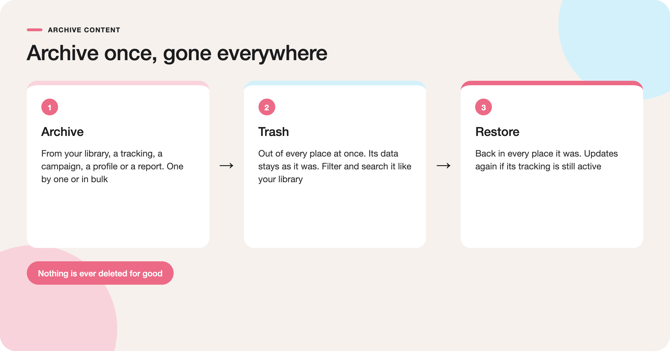
With Archive content, you can move any publication you don't need to the Trash. It disappears from everywhere it appears in Influencity, so your library, trackings and campaigns only show what you care about. Nothing is ever deleted for good: you can restore any publication at any time.
This article helps you to:
- archive publications one by one or in bulk
- understand what happens to an archived publication and its data
- find your archived content in the Trash
- restore publications when you need them again
Why archive content
|
Benefit |
What it means for you |
|---|---|
|
A cleaner library |
Keep only the publications you need, even if your trackings collect thousands |
|
Faster searching and filtering |
Fewer irrelevant posts means you find the right content sooner |
|
Lighter downloads and exports |
Only the content you keep is included when you download it |
|
No risk |
Archived content stays in the Trash, and you can restore it whenever you want |
Archive a publication
You can archive a publication from anywhere it appears:
- your content library
- a tracking
- a campaign
- a profile in your IRM
- a report
To archive:
- One publication: open its actions menu, or the publication itself, and send it to the Trash.
- Several publications: select them in the table and use the bulk action to send them to the Trash.
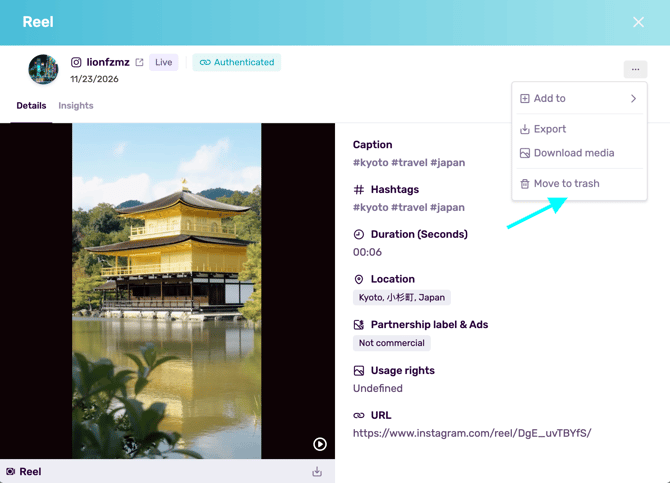
Confirm, and the publication is archived.
What happens when you archive
|
What changes |
Details |
|---|---|
|
It disappears everywhere |
The publication is removed from every place that contains it: your library, trackings, campaigns, the creator's profile and reports. You don't need to remove it from each one |
|
Its data stops updating |
An archived publication keeps the data it had when you archived it. It isn't refreshed with the rest of the tracking |
|
It's never deleted |
The publication stays in the Trash, ready to restore. There's no permanent delete |
Good to know: Legacy reports keep their own copy of each publication you added to them. Archiving a publication doesn't remove it from a Legacy report. In the new Reports, archived publications are removed like everywhere else.
Find your archived content in the Trash
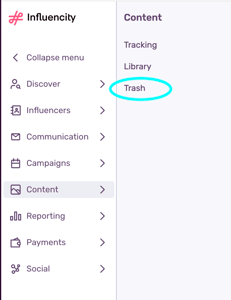
Go to Content and open the Trash. It works exactly like your content library: you can filter, search and create views to find what you archived.
Restore a publication
- Open the Trash.
- Select the publication, or several at once.
- Click Restore content.
The publication returns to every place it was before: your library, trackings, campaigns, the creator's profile and reports.
Will its data update again? It depends on its tracking:
|
If the tracking is… |
What happens after you restore |
|---|---|
|
Still active |
The publication updates again with the rest of the tracking, every 8 hours |
|
Already finished |
The publication keeps the data it had when you archived it |
Tips to get the most out of Archive content
- Clean up always-on trackings regularly. Profile trackings collect everything a creator posts. Archive what isn't relevant so your library stays useful.
- Use filters, then archive in bulk. Filter your library by tracking, creator, network or date, select the results and archive them in one go.
- Archive before you download. Downloads and exports only include the content you keep, so tidy up first.
- Restore while the tracking is active. If you archived something by mistake, restore it before the tracking ends so its data keeps updating.
- Remember Legacy reports. If a publication must disappear from a Legacy report too, remove it from that report as well.
FAQ
Can I delete a publication permanently?
No. Archived publications always stay in the Trash, so you can restore them whenever you want.
If I archive a publication from a tracking, is it removed from my campaign too?
Yes. Archiving removes the publication from every place it appears, wherever you archive it from.
Do archived publications keep updating?
No. They keep the data they had when you archived them.
If I restore a publication, does its data update?
Only if its tracking is still active. Then it updates with the rest of the tracking, every 8 hours.
Is an archived publication removed from my reports?
From the new Reports, yes. Legacy reports keep their own copy, so it stays there.
Can I search and filter the Trash?
Yes. It works like your content library, with the same filters and views.
Next steps
- Group the content you keep in one place: How to Bring Your Publications Together in a Report.
- Learn more about your content library: see the Content articles.