![LogoInfluencity_Negative.png]](https://knowledge.influencity.com/hs-fs/hubfs/LogoInfluencity_Negative.png?height=40&name=LogoInfluencity_Negative.png)
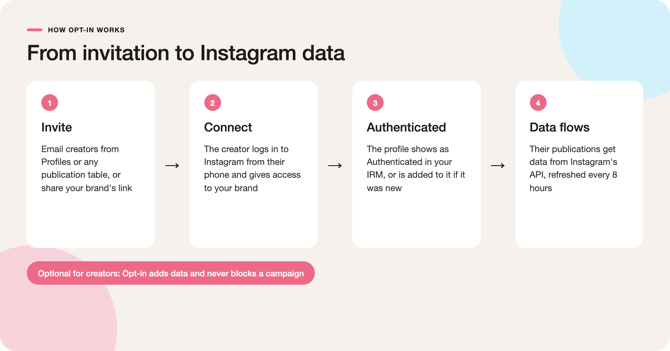
With our Opt-in, the influencers you work with can connect their Instagram account to your brand in Influencity. Once they do, the data of their publications comes straight from Instagram's own API, so you work with first-party numbers instead of estimates or screenshots.
At Influencity, Opt-in is an extra, never a gate. Influencers who don't connect can still be in your IRM, your campaigns and your trackings exactly as before. Those who do bring richer, more reliable data with them.
This article helps you to:
- understand what Opt-in gives you
- invite influencers one by one, in bulk or with your brand's link
- read the Opt-in statuses
- know where the Instagram data appears and which value wins
What Opt-in gives you
|
Benefit |
What it means for you |
|---|---|
|
Data from the source |
Publication metrics come from Instagram's API for every authenticated creator. They're locked and labelled, so everyone knows where each number comes from |
|
Data you couldn't see before |
Some metrics aren't public, such as Stories data. When Instagram's API returns them, you see them in Influencity |
|
Less chasing |
No more asking creators for screenshots after every post. Their data arrives with your tracking, every time it refreshes |
|
No barriers for influencers |
Connecting is optional and takes a minute from a phone. You decide who to invite and when |
Good to know: Opt-in works with Instagram accounts and, for now, brings publication data, not profile data.
Where to find Opt-in
You'll find a new Opt-in column in two places:
- Profiles (IRM): the connection status of each Instagram profile.
- Publication tables: in your trackings, content library and reports, whether the influencer behind each publication has connected.
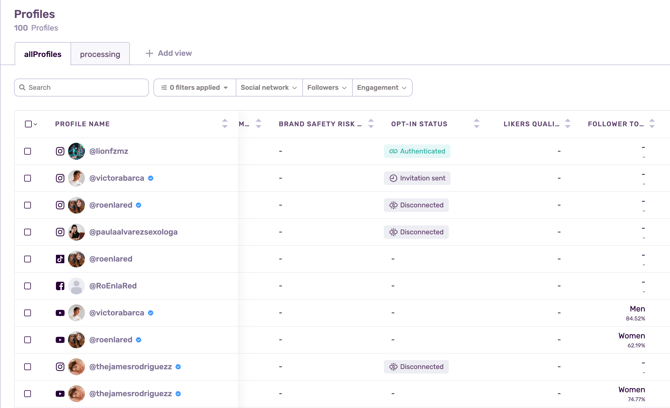
You can invite creators from either column.
Invite creators to connect
Invite one creator
- Go to Profiles, or to any table of publications.
- In the Opt-in column of the creator, choose Copy link to copy a personal link for that creator and send it however you like (DM, WhatsApp or your own email), or Send email so Influencity emails the influencer an invitation with a button to connect.

Invite several creators at once
- Select the profiles or publications you want.
- Click Invite to Opt-in.
- Choose Send to email each creator their invitation. Before anything goes out, a confirmation window shows who will get the email and who won't.
- Or choose Copy link. With more than one creator selected, this copies your brand's generic link.
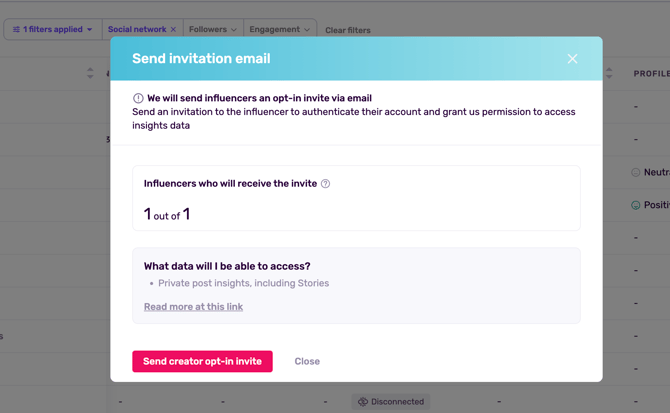
An invitation email is not sent when:
- the creator has no email address in your IRM
- the profile isn't an Instagram profile
- the creator already received an invitation in the last hour, so nobody gets flooded with emails
- the influencer is already connected
Share your brand's generic link
- Go to Settings and copy your brand's Opt-in link.
- Share it wherever creators will see it: your briefing, onboarding form, application page or casting call.
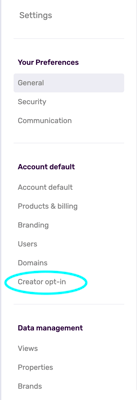
Anyone can connect through the generic link, even creators who aren't in your IRM yet. They're added to your IRM automatically.
What the influencer sees
The email and both links lead to the same page, designed for desktop and phones, since most creators will open it there.
- The page explains that Influencity uses a trusted third-party service to connect their account securely.
- The creator taps Log in and signs in to Instagram.
- The first time, Instagram asks them to allow access to their information.
- A confirmation page tells them they've given access to your brand.
If the creator uses a different account with a personal link, the creator must connect the Instagram account you invited. If they sign in with another one, such as a secondary account, we let them know and ask them to try again with the right account. With your generic link, any Instagram account can connect.
If anything else goes wrong, the influencer sees a general error message and can try again.
What changes in your IRM
Refresh Profiles after an influencer connects:
- If the creator was already in your IRM, their status changes from Disconnected to Authenticated.
- If the creator was new, a profile is created with Opt-in as its source and the status Authenticated.
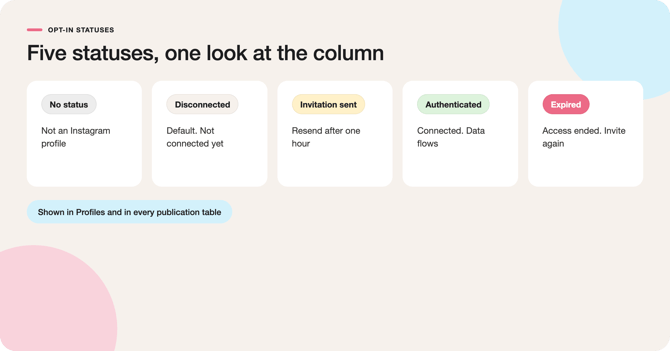
Opt-in statuses
|
Status |
What it means |
What you can do |
|---|---|---|
|
No status |
The profile isn't on Instagram, so Opt-in doesn't apply |
Nothing |
|
Disconnected |
The default for every Instagram profile. The creator hasn't connected |
Invite them |
|
Invitation sent |
You emailed an invitation |
Wait, or resend after one hour |
|
Authenticated |
The creator connected. Instagram data flows into their publications |
Track their content to get the data |
|
Expired |
Access ended, because it expired under Instagram's rules or the creator removed it |
Invite them again |
Where the Instagram data appears
Instagram data shows in the publications of authenticated influencers, wherever those publications are: a tracking, your content library or a report. Publications currently come from your content trackings, so make sure the creator's content is tracked.
In any publication table, and in the Insights of each publication, hover over a field to see where its value comes from. Fields from Instagram's API are locked and labelled as coming from Instagram, so nobody overwrites them by mistake.
Which value wins
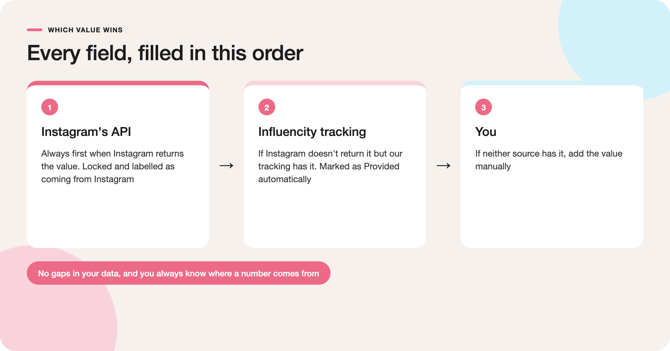
Instagram's API sometimes stops returning a metric. So you never end up with gaps, Influencity fills each field in this order:
|
Priority |
Source |
How it shows |
|---|---|---|
|
1 |
Instagram's API |
Locked, labelled as coming from Instagram |
|
2 |
Influencity tracking, when Instagram doesn't return the value |
Marked as Provided automatically |
|
3 |
You, when neither source has it |
Added manually |
How often it updates
Instagram data refreshes every 8 hours, at the same time as your tracking.
Tips to get the most out of Opt-in
- Ask early. Include the invitation when you confirm a collaboration or send the brief. Data starts flowing from the moment the creator connects.
- Put your generic link to work. Add it to your application form, onboarding pack or briefing template, so every new creator can connect without you doing anything.
- Tell creators what's in it for them. Connecting means no more screenshot requests after each post.
- Keep emails up to date in your IRM. Invitations can only be emailed to creators with an email address on their profile.
- Invite in bulk after shortlisting. Select your final creators and send all the invitations in one go.
- Check before you chase. Use the Opt-in column to see who's still on Invitation sent.
- Track authenticated creators. Instagram data arrives through their publications.
- Watch for Expired. Re-invite those creators so your data doesn't stop mid-campaign.
FAQ
Do creators have to connect to take part in my campaigns?
No. Opt-in never blocks anything. Creators who don't connect can join your campaigns, trackings and reports as usual.
Which social networks does Opt-in support?
Instagram.
Can a creator connect if they're not in my IRM?
Yes. When a creator connects through your generic link, they're added to your IRM with Opt-in as the source.
Can I edit a value that came from Instagram?
No. Values from Instagram's API are locked. You can add a value manually only when neither Instagram nor our tracking provides it.
How long does a connection last?
It depends on Instagram's rules, and the creator can remove access at any time. If access ends, the status changes to Expired and you can invite them again.
A creator didn't get my invitation. Why?
Check that their profile has an email address and is an Instagram profile. If you invited them less than an hour ago, wait before resending. You can also copy their personal link and send it yourself.
I don't see the Opt-in column.
Contact your account manager.