![LogoInfluencity_Negative.png]](https://knowledge.influencity.com/hs-fs/hubfs/LogoInfluencity_Negative.png?height=40&name=LogoInfluencity_Negative.png)
Influencity's Instagram rate estimation engine provides data-backed, realistic cost ranges for influencer marketing campaigns based on multi-variable statistical modeling.
Our Pricing Model
Influencer rate cards vary widely across markets, niches, and platforms, making fixed single-value estimates unrealistic for negotiations. Single fixed-rate estimates often create discrepancies when compared against public calculators or real-world creator rate cards.
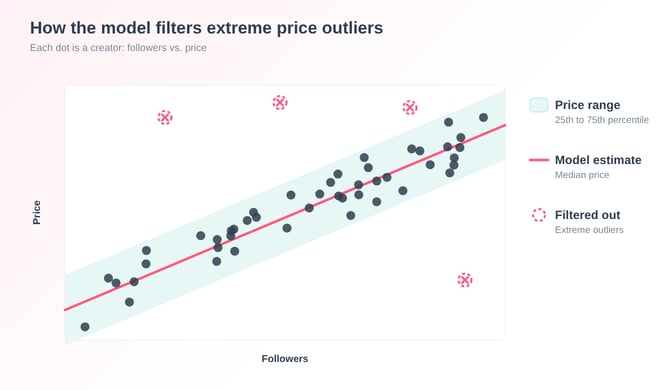
To give teams a defensible foundation for budget planning and negotiations and provide a defensible benchmark for negotiations, Influencity pricing engine works with statistically validated price ranges.
Key objectives elements:
- Dynamic Price Ranges: Minimum, median, and maximum cost estimates.
- Enhanced CPM Benchmarks: Individual format CPMs and a unified Average CPM metric.
- Statistical Rigor: Algorithm factors in audience quality, engagement, niche, country GDP, and Meta ad rates.
How to Access and Use Estimated Rates in Your Workflow
Follow these steps to navigate the updated platform interface and incorporate rate ranges into your day-to-day campaign management.
Step 1: Locate the Estimated Rates Section
- Open any Instagram creator profile in profiles or Influencers.
- In the profile header KPIs, notice that legacy single-cost indicators have been replaced by Median Cost.
- Scroll to the Estimated Rates section under the main KPIs.
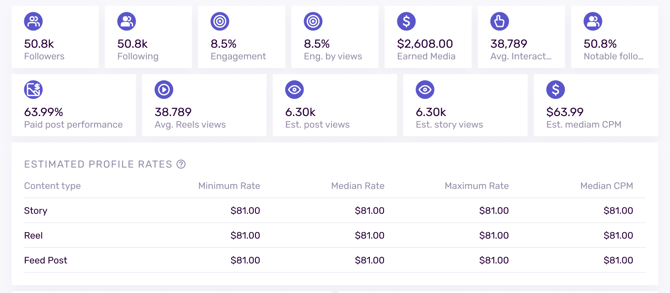
Step 2: Review Rates Across Formats (Posts, Stories, Reels)
In the Estimated Rates table, review the three core publication formats:
- Post: Estimated rate range for feed posts.
- Story: Estimated rate range for 24-hour stories.
- Reel: Estimated rate range for video reels.
For each format, the platform displays three price boundaries:
- Minimum (25th): The lower cost boundary for the creator.
- Median: The central statistical estimate and primary reference price.
- Maximum (75th): The upper cost boundary.
Step 3: Evaluate Cost Efficiency with Format & Average CPM
To determine if a creator fits your budget efficiency goals:
- Check the Format CPM column next to Posts, Stories, or Reels to evaluate cost per thousand impressions for specific formats.
- Look at the Average CPM KPI card in the top right of the section.
Step 4: Apply Price Ranges to Negotiation Scenarios
Use the statistical boundaries to guide campaign budgeting and talent negotiations:
| Metric | When to Use This Number in Negotiations |
| Minimum Rate (25%) |
• Initial opening offer during creator outreach. • Negotiating multi-post bundles or long-term brand ambassador packages. • Evaluating creators with lower engagement or lower audience quality. |
| Median Rate |
• Standard baseline budget allocation for single deliverables. • Defensible reference point when pitching campaign budgets to internal stakeholders. |
| Maximum Rate (75%) |
• Budgeting for high-demand creators or peak seasonal campaigns. • Factoring in content usage rights, exclusivity clauses, or whitelisting. |
Step 5: Compare Influencers & Share Custom Proposals
The pricing structure automatically syncs across all platform tools:
- Influencer Comparisons: Add multiple creators to a comparison matrix to review side-by-side median Reel, Story, and Post costs.
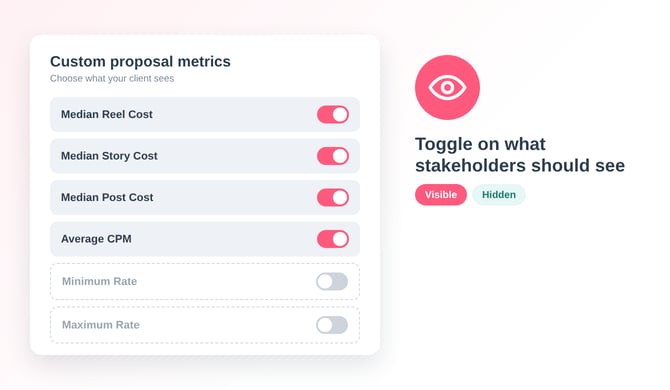
- Custom Proposals: When building client proposals, select which price metrics (Median Reel Cost, Average CPM, etc.) are visible to external stakeholders.
- Data Exports & API: Export campaign lists to CSV/PDF or query the API, all outputs reflect the updated range schema.
Core Calculation Variables
The estimation engine processes six core data inputs for every profile:
- Follower Count: Baseline account reach.
- Engagement Rate: Interaction rate calculated by Influencity.
- Category / Niche: Content vertical demand adjustments.
- Audience Quality Score: Percentage of real, active followers versus low-quality/bot accounts.
- Country GDP / Purchasing Power: Regional economic adjustments based on IMF per capita income data.
- Meta CPM Index: Public Meta advertising CPM index weighted at 0.02 within the formula.
Historical Campaign Protection: Legacy account metrics were automatically migrated to the new data structures. Re-analyzing any existing profile instantly recalculates rates using the new method.