![LogoInfluencity_Negative.png]](https://knowledge.influencity.com/hs-fs/hubfs/LogoInfluencity_Negative.png?height=40&name=LogoInfluencity_Negative.png)
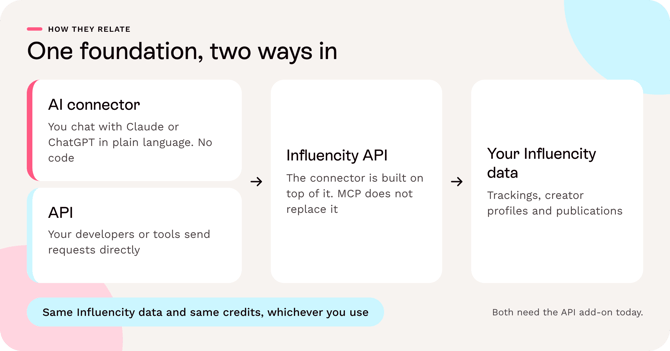
Use the AI connector if you want to ask questions about your creators and campaigns in plain language, with no code. Use the API if your developers or data team want to build something that runs on its own, such as a feed into your dashboards or warehouse. Many teams will use both, because the connector runs on top of the API.
Key terms
|
Term |
What it means |
|---|---|
|
API |
A set of rules that lets one piece of software ask another for data or ask it to do something. Influencity's API is a REST API that exchanges JSON and is protected by a token |
|
MCP (Model Context Protocol) |
An open standard for connecting AI assistants to tools and data. It does not replace APIs: an MCP server uses an API behind the scenes |
|
MCP server |
The program that offers a product's functions to AI assistants. Influencity's MCP server calls the Influencity API for you |
|
AI application |
The assistant your team chats with, such as Claude or ChatGPT |
|
Connector |
What Claude and ChatGPT call the add-on that links the assistant to a product. The Influencity connector is live in Claude and ChatGPT |
Side by side
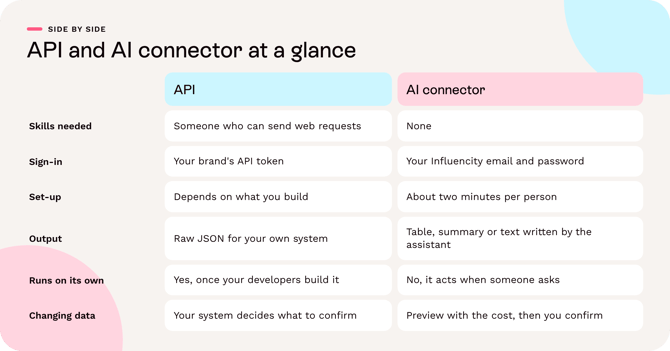
|
API |
AI connector (Claude and ChatGPT) |
|
|---|---|---|
|
Best for |
Repeatable workflows built by your developers or data team |
Marketers and CSMs who want answers and actions in plain language |
|
Skills needed |
Someone who can send web requests and handle JSON |
None. No coding, no keys to copy |
|
How you use it |
Your own code, scripts or integration tool call the endpoints |
You chat with Claude or ChatGPT, which calls Influencity for you |
|
Sign-in |
Your brand's API token, sent as a Bearer token |
Your own Influencity email and password |
|
Set-up time |
Depends on what you build |
About two minutes per person |
|
What it covers |
Content tracking and creator profiles (IRM) |
The same areas, with 18 functions in total |
|
Reading data |
Yes: trackings, publications, profiles and quotas |
Yes: the same, plus a ready-made campaign report and a side-by-side comparison of 2 to 5 profiles |
|
Changing data |
Yes: create and change trackings and profiles. You decide what confirmation your own tool asks for |
Yes, and every action that uses credits, pauses or deletes shows a preview with the cost and waits for your confirmation |
|
Output |
Raw JSON that your system turns into dashboards or tables |
A table, a summary or a text, written by the AI assistant |
|
Runs on its own |
Yes, once your developers build it |
No. It acts when someone asks in a chat |
|
Credits |
Same analyses and tracking slots as the platform |
The same credits, always after a preview |
|
Limits |
10 requests per second and 100,000 requests per day for your organization |
The same limits, as the connector uses the API |
|
Requires |
The API add-on, available for annual plans |
The API add-on |
The connector is not a separate product with its own data. It reads and changes the same Influencity data as the API, with your brand's own API access.
Which one do I need?
These are illustrative scenarios, not customer stories.
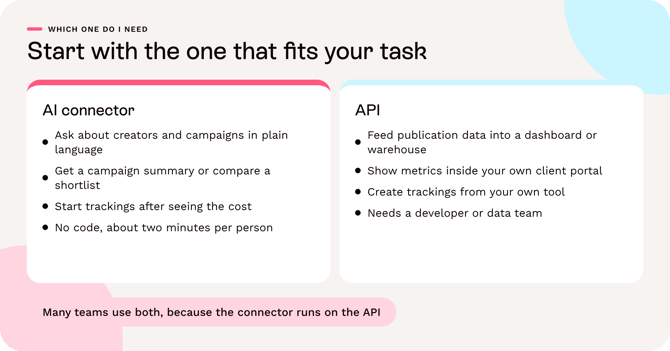
|
If you are... |
And you want to... |
Start with |
|---|---|---|
|
An agency account manager |
Get a campaign summary for a client call, or turn results into a text for a report |
AI connector |
|
A brand marketer |
Check how a creator's audience looks, compare a shortlist, or see how many credits are left |
AI connector |
|
A social or PR team member |
Start tracking a handful of creators for a new campaign, after seeing the cost |
AI connector |
|
A marketing lead |
Understand the options before deciding who should set things up |
This article, then ask your account manager |
|
A data or BI team |
Load publication-level data into your warehouse or dashboard on a schedule |
API |
|
An agency with a client portal |
Show live campaign metrics inside your own branded reporting |
API |
|
A developer or platform team |
Create trackings and sync creator lists from your own tool |
API |
You can use both. A data team can build the dashboard feed through the API, while the marketing team uses the connector to ask follow-up questions. Both need the API add-on, and both draw on the same credits.
How they work together
The connector is built on the API. When you ask Claude or ChatGPT a question, the connector turns it into one or more API calls for your brand, and the assistant presents the answer. That has two practical consequences:
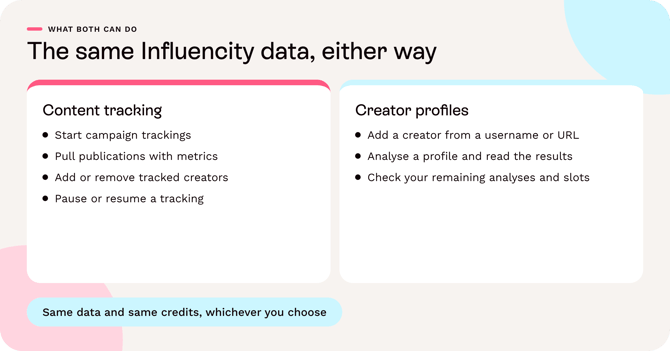
- Same data: what a developer creates through the API appears in the platform and in the connector, and the other way round.
- Same credits and limits: analyses, tracking slots and request limits are shared, so a large automated job can affect what is left for your team's chats. Check your quota before bulk actions.
Where human review still matters
With the API, you decide what your own system confirms before it changes data. With the connector, you confirm each action after a preview. In both cases, any interpretation of the numbers is yours, or the AI assistant's, and should be checked before it goes to a client.
FAQ and next steps
Does MCP replace the API? No. MCP is a standard that lets AI assistants use tools. The Influencity MCP server calls the Influencity API underneath.
Can I use the connector without the API add-on? The connector is included in the API add-on, available for annual plans. Ask your account manager for pricing.
Does the connector see all of my brands at once? In Claude, one connection works with one brand. In ChatGPT, you can connect several brands as separate accounts and it asks which one to use before any change.
Which assistants are supported? Claude or ChatGPT (web or desktop app).
Where is the data processed? The data the assistant reads is sent to Claude (Anthropic) or ChatGPT (OpenAI), under your own agreement with that provider. With the API, your data goes wherever your own system sends it.
Next steps
- Want to try the connector? Follow the install guide: Influencity AI Connector for Claude and ChatGPT: Set-Up and Use.
- Want to build with the API? Read Influencity API: What it Does for You and How to Get Started and the API documentation.
- Not sure which fits? Talk to our team.