![LogoInfluencity_Negative.png]](https://knowledge.influencity.com/hs-fs/hubfs/LogoInfluencity_Negative.png?height=40&name=LogoInfluencity_Negative.png)
The main overview page includes a calendar that displays pending tasks, a list of all the projects, and the option to create a project.
Edit the status of your projects from this very page, by going to the Status column and selecting an option from the drop-down menu, or open a project to see all of its data.
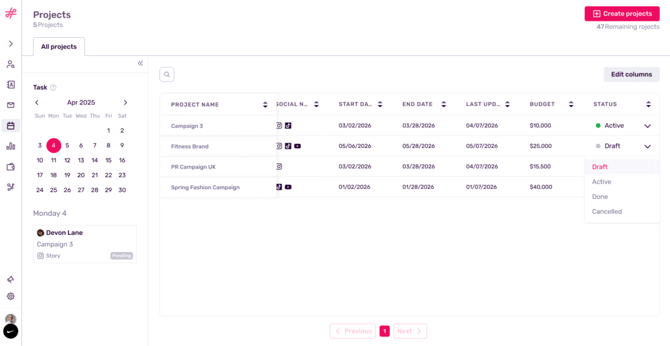
Projects Page
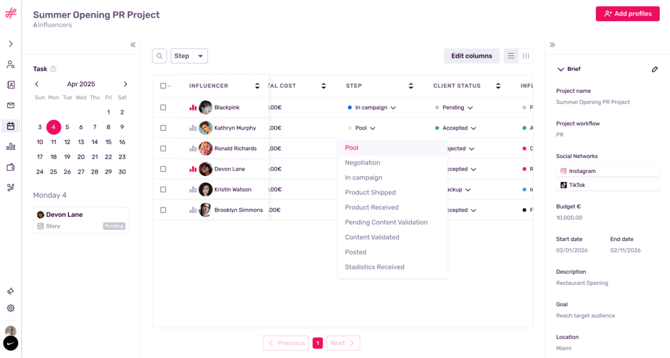
The actual projects page offers various options. On the left, we have a calendar specific to the events of this project. On this particular day, one influencer profile is in review.
In the center, you’ll see all the profiles included in this project. As they progress through your campaign, you can update their status as a mass action or one-by-one, by going to the column Step and selecting an option.
Note: A profile must be associated with an influencer in order to be included in a project. Learn how to do so here.
Initially, all profiles will have their status set to Pool, meaning they’ve been included in a project but their full participation is pending price negotiation and client approval. Once an action is completed, for example, their data and signed contract have been received, this profile can be moved to the next step.
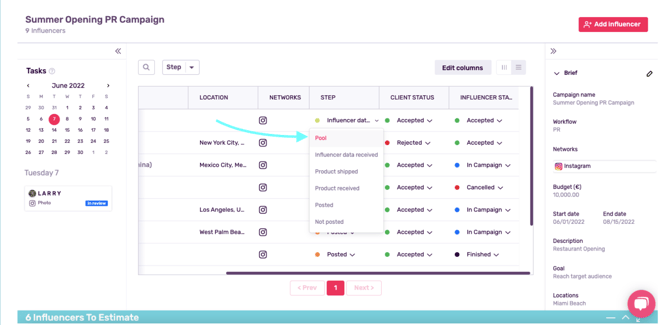
Finally, on the right, you can edit your Project Description or add more influencer profiles. For example, if you’ve expanded your budget or redefined your dates, you can save these changes here and all brand users will see this updated information.
Keep learning about the Influencity Projects product by checking out our FAQs.